
|
TPA81 Thermopile Array (Technical Specification)
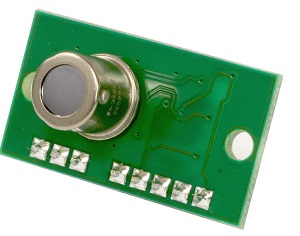
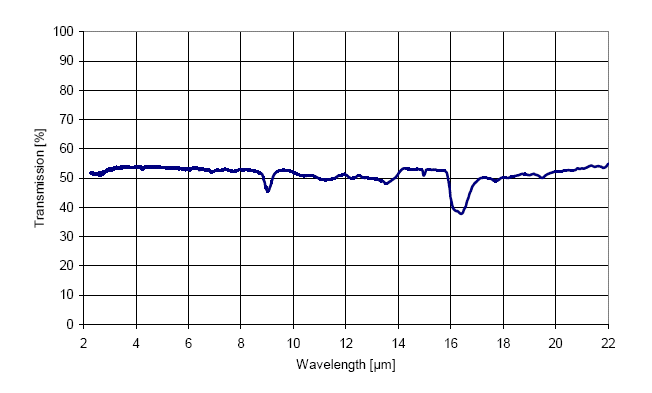
Introduction The TPA81 is a thermopile array detecting infra-red in the 2um-22um range. This is the wavelength of radiant heat. The Pyro-electric sensors that are used commonly in burglar alarms and to switch on outside lights, detect infra-red in the same waveband. These Pyro-electric sensors can only detect a change in heat levels though - hence they are movement detectors. Although useful in robotics, their applications are limited as they are unable to detect and measure the temperature of a static heat source. Another type of sensor is the thermopile array. These are used in non-contact infrared thermometers. They have a very wide detection angle or field of view (FOV) of around 100° and need either shrouding or a lens or commonly both to get a more useful FOV of around 12°. Some have a built-in lens. More recently sensors with an array of thermopiles, built-in electronics and a silicon lens have become available. This is the type used in the TPA81. It has an array of eight thermopiles arranged in a row. The TPA81 can measure the temperature of 8 adjacent points simultaneously. The TPA81 can also control a servo to pan the module and build up a thermal image. The TPA81 can detect a candle flame at a range 2 metres (6ft) and is unaffected by ambient light! Spectral Response The response of the TPA81 is typically 2µm to 22µm and is shown below:
Field of View (FOV) The typical field of view of the TPA81 is 41° by 6° making each of the eight pixels 5.12° by 6°. The array of eight pixels is orientated along the length of the PCB - that's from top to bottom in the diagram below. Pixel number one is nearest the tab on the sensor - or at the bottom in the diagram below.
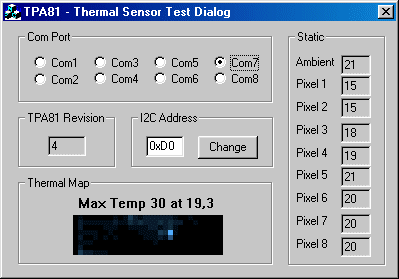
Sensitivity Here's some numbers from one of our test modules: In a warmer room at 18°C, the candle measures 27°C at 2 meters. This is because the candle only occupies a small part of the sensor's field of view and the candle's point heat source is added to the background ambient - not swamped by it. A human at 2 meters will show up at around 29°C with a background 20°C ambient. The following is a snapshot of our test program. It displays a 32x8 bitmap produced by using a servo to pan the sensor. If you want a copy of this Windows-based program, it's here, but you will need a USB-I2C to connect the TPA81 to your PC. Here you can see a candle flame about a meter away showing up as the bright spot.
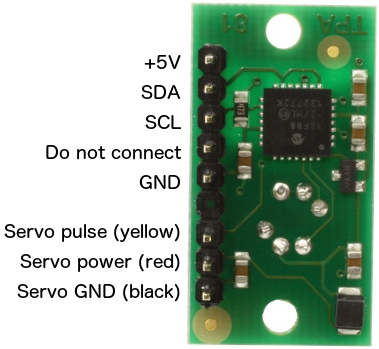
Connections All communication with the TPA81 is via the I2C bus. If you are unfamiliar with the I2C bus, there is a tutorial which will help. The TPA81 uses our standard I2C 5-pin connection layout. The "Do Not Connect" pin should be left unconnected. It is actually the CPU MCLR line and is used once only in our workshop to program the PIC16F88 on-board after assembly, and has an internal pull-up resistor. The SCL and SDA lines should each have a pull-up resistor to +5v somewhere on the I2C bus. You only need one pair of resistors, not a pair for every module. They are normally located with the bus master rather than the slaves. The TPA81 is always a slave - never a bus master. If you need them, I recommend 1.8k resistors. Some modules such as the OOPic already have pull-up resistors and you do not need to add any more. A servo port will connect directly to a standard RC servo and is powered from the module's 5v supply. We use an HS311. Commands can be sent to the TPA81 to position the servo, the servo pulses are generated by the TPA81 module.
Registers The TPA81 appears as a set of 10 registers.
Only registers 0, and 1 can be written to. Register 0 is the command register and is used to set the servo position and also when changing the TPA81's I2C address. It cannot be read. Reading from register 0 returns the TPA81 software revision. Writing to register 1 sets the servo range - see below. It cannot be read back, reading register 1 reads the ambient temperature. There are 9 temperature readings available, all in degrees centigrade (°C). Register 1 is the ambient temperature as measured within the sensor. Registers 2-9 are the 8-pixel temperatures. Temperature acquisition is continuously performed and the readings will be correct approximately 40mS after the sensor points to a new position. Servo Position Commands 0 to 30 set the servo position. There are 31 steps (0-30) which typically represent 180° rotation on a Hitec HS311 servo. The calculation is SERVO_POS*60+540uS. So the range of the servo pulse is 0.54mS to 2.34mS in 60uS steps. Writing any other value to the command register will stop the servo pulses.
Firmware Version 6 or higher. As from Version 6 (March 2005) we have added a new write-only register (register 1) to allow you to vary the range of the servo stepping. It defaults to the same 180-degree range on a Hitec HS311 servo as earlier versions. You can write values from 20 to 120 to the range register. If you attempt to write a value less than 20, it will be set to 20. If you attempt to write a value greater than 120, it will be set to 120. The calculation for the range in uS is ((31*ServoRange)/2). Setting a range of 20 will give a range of (31*20)/2 or 310uS. Setting a range of 120 will give a range of (31*120)/2 or 1860uS. In all cases, the available range is centered on the servo's mid position of 1500uS. So in the first example, the 310uS range will be from 1345uS to 1655uS (Or 1.345 to 1.655mS if you prefer). The second example of the 1860uS range centered on 1500uS gives a range of 570uS to 2430uS. On power up the range register is set to 120, which gives the same range as earlier versions. Changing the I2C Bus Address To change the I2C address of the TPA81 you must have only one module on the bus. Write the 3 sequence commands in the correct order followed by the address. For example; to change the address of a TPA81 currently at 0xD0 (the default shipped address) to 0xD2, write the following to address 0xD0; (0xA0, 0xAA, 0xA5, 0xD2 ). These commands must be sent in the correct sequence to change the I2C address, additionally, No other command may be issued in the middle of the sequence. The sequence must be sent to the command register at location 0, which means 4 separate write transactions on the I2C bus. Additionally, there MUST be a delay of at least 50uS between the writing of each byte of the address change sequence. When done, you should label the sensor with its address, if you lose track of the module addresses, the only way to find out what it is to search all the addresses one at a time and see which one responds. The TPA81 can be set to any of eight I2C addresses - 0xD0, 0xD2, 0xD4, 0xD6, 0xD8, 0xDA, 0xDC, 0xDE. The factory default shipped address is 0xD0.
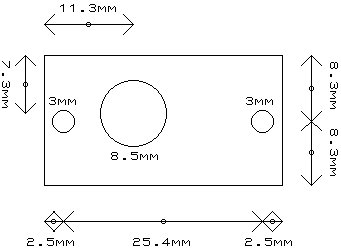
Mechanical Layout
|
|||||||||||||||||||||||||||||||||||||||||||||||||||||||||||


+(39) 347 051 5328
Italy - Kazakhstan


09.00am to 18.00pm
About
We offer the best and economical solutions, backed by 27+ years of experience and international standards knowledge, echnological changes, and industrial systems.
Our Services
Marketing Materials


Marketing Materials1


