
|
128 Users Combination Lock with LCD Display PIC16F628
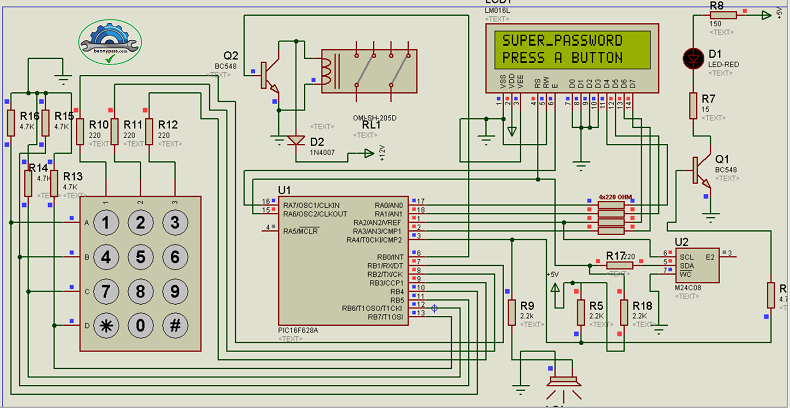
Password electronic lock circuit PIC16F628A can save the passwords of up to 1235 users. Users can change their passwords at any time. PIC16F628 and external Eeprom 24c08 were used to store these passwords. A 2×16 LCD is used to display system messages. A piezoelectric buzzer is used to make “beep sounds” to indicate the number pressed and the order in which it is written. The system output uses a relay to control the lock on the door through its contacts. In general the circuit is simple. As for the power supply, it must provide 12 volts for the relay and 5 volts for the circuit. It can be done traditionally with transformers, rectifiers and capacitors, regulated with 7805 or using switched sources. This choice is up to the hobbyist. An 8-digit password must be entered to access the system. If true (or registered), you need to activate the door lock; The message 'ACCESS RELEASED' and '–WELCOME–' will appear. A delay is set for exit that lasts a few seconds and then turns off again. You can also choose whether the output is pulsed or continuously active in the ASM code. If the password is incorrect, the message "INCORRECT PASSWORD" will appear. After 3 attempts, the system is blocked for 1 minute for security reasons. These times and messages can be changed in the ASM code.
How to save passwords for users?
Someone needs to be appointed as the password manager. There will be an 'administrator password' which allows you to give each user a temporary password.
When you enter the administrator password, the system will ask for the apartment number and 5 additional digits that make up the temporary password. Ex. apt 45 – enter ADM password (this is ‘#741593#’ in ASM), then enter ‘045xxxxx’; where 'x' is any number between 0 and 9. This password must be given and the user must be informed that it must be changed to another password immediately. How can a user change their password to another password? Using a general password by typing ‘#yyy759#’ where y = apartment number. Ex. circle 4 – enter ‘#004759#’. You will be asked for your old password so you can change it. After you enter the apartment password correctly, it will ask you to enter a new password and then ask for confirmation. All users need to know this public password so they can change their passwords from time to time. A 'beep' sound will be heard while typing. A longer 'beep' will be heard between operations. Another feature is that when you start typing and stop for any reason, the system resets after 20 seconds. The LCD backlight turns on when a key is pressed and turns off after a period of inactivity. This circuit is recommended for those who love automation, in fact we use it for condominium locks, opening garage doors or gardens, but it is possible to apply it where there is a high level of security. We recommend it in mountain areas where temperatures are very low during the winter, in fact, our circuit is tested for temperatures lower than -30 degrees. For any information please contact us.
On request the circuit can be implemented with a 16 bit (larger) microcontroller for controlling more outputs, and larger external memory such as the 24C512. The example circuit is with the PIC16f628, with assembly source code. For more details do not hesitate to contact us
|

+(39) 347 051 5328
Italy - Kazakhstan


09.00am to 18.00pm
About
We offer the best and economical solutions, backed by 27+ years of experience and international standards knowledge, echnological changes, and industrial systems.
Our Services
Marketing Materials


Marketing Materials1


