|
Battery Mode (Backup) UPS working principle
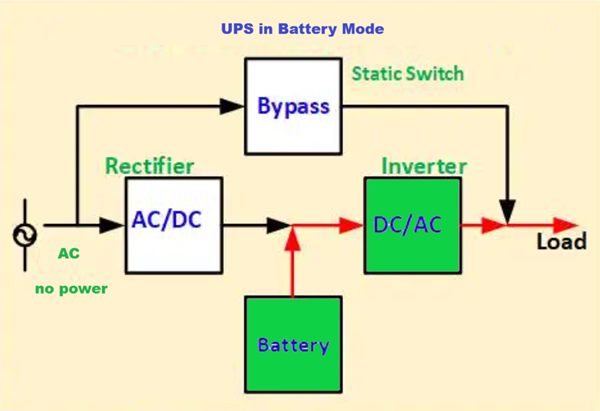
A Battery Mode (Backup) UPS works by immediately switching to internal battery power when AC mains fail, ensuring uninterrupted operation for connected devices. It uses an inverter to convert DC power from the battery into AC power, typically taking 4–10ms in offline/standby modes. Once power returns, the charger recharges the battery, while the inverter stops.
Key Components in Battery Mode
- Battery: Stores energy (DC) to provide backup.
- Inverter: Converts DC (battery) to AC (load).
- Transfer Switch: Disconnects from mains and connects to the battery/inverter.
Working Steps during Battery Mode
- Normal Mode: Mains power directly feeds the load while simultaneously charging the battery.
- Battery Mode: When mains power is interrupted or unstable, the battery powers the inverter, which then supplies the load.
- Return to Normal: Once the utility power is restored and stable, the transfer switch automatically reconnects to the main power and resumes charging the battery
Battery mode is designed for short-term, critical power, allowing users to save work or safely shut down equipment.
Working Steps during Battery Mode
- Detection: The UPS detects a voltage surge, or complete failure of the main utility power.
- Switching: The Transfer Switch quickly switches the load from the mains power to the UPS inverter output.
- Discharge: The battery starts discharging, converting stored chemical energy into DC.
- Conversion: The inverter converts DC to clean AC, powering connected devices.
- Shutdown/Return: The process continues until the battery is depleted or utility power is restored, at which point the UPS switches back to charging mode
Note: In Line-Interactive UPS, an AVR (Automatic Voltage Regulator) tries to correct voltage before switching to battery, reducing battery usage.
In Battery Mode (also known as Backup or Discharge Mode), an Uninterruptible Power Supply (UPS) functions as the primary power source when the main utility electricity fails or becomes unstable.
Core Working Principle
When the UPS detects a power interruption or significant voltage drop (e.g., below ~170V), it activates a high-speed transition to battery power. The internal process follows these steps:
- Detection: The control unit constantly monitors the incoming AC grid voltage. If the voltage falls outside a safe "window," the UPS triggers battery mode.
- Energy Release: The energy stored as chemical energy in the Batteries (typically lead-acid or lithium-ion) is released as Direct Current (DC).
- Inversion: Since most electronic devices require Alternating Current (AC), the Inverter converts the battery's DC power back into stable AC power.
- Transfer: A Static Transfer Switch or relay completes the connection to the load. This switchover happens in milliseconds (usually 0ms to 10ms), preventing sensitive devices like computers from rebooting.
Variation by UPS Topology
The "seamlessness" of the working principle depends on the UPS design:
- Standby (Offline): The battery and inverter remain idle until an outage occurs, then they "kick in" within 4–10ms.
- Line-Interactive: Similar to standby but uses an Automatic Voltage Regulator (AVR) to handle minor fluctuations without using the battery, preserving its lifespan.
- Online (Double-Conversion): The inverter is always powering the load from a DC bus (fed by either the rectifier or the battery). When mains fail, there is zero transfer time because the battery is already part of the active circuit.
Key Components Involved
- Batteries: The storage unit (Lead-Acid or Lithium-Ion).
- Inverter: Converts DC from the battery to AC for the equipment.
- Control Unit: The "brain" that monitors grid health and manages the switchover.
Once utility power is restored, the UPS automatically switches back to Normal Mode, using the grid to power the load and recharging the batteries simultaneously.
Are you looking for a backup time calculation for a specific device, or do you need help troubleshooting a UPS that won't enter battery mode? Ask Questions and will answare you
|