
| Digital Multimeter Working Principle
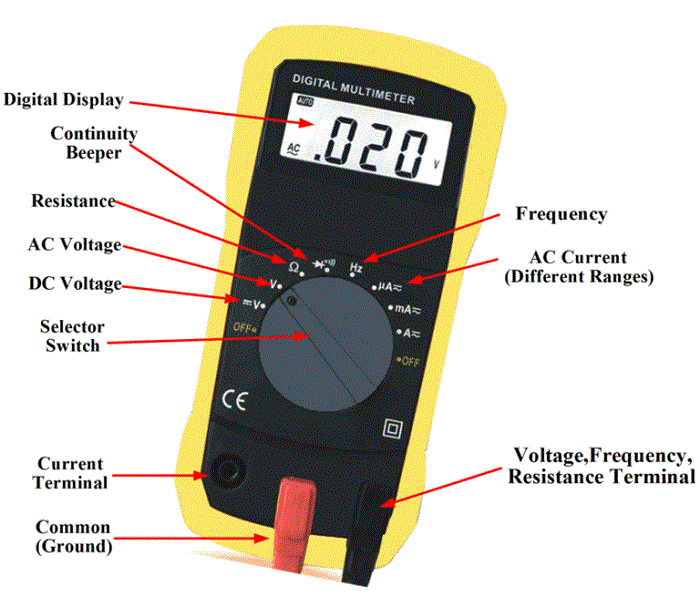
Figure1 A digital multimeter (DMM) is a multifunctional meter that displays its electrical quantitative values on an LCD screen. A digital multimeter much like an analog meter, it is able to read voltage, current, and resistance. What makes a digital multimeter differ from the analog meter is its ability to display measured electrical values quickly without any computations. Because of its design, a processor can be built into the meter which allows the user to take measurements of frequency, the inductance of a coil, capacitance of a capacitor, and a host of other high functional electrical measurements. There two types of digital multimeters (DMM): scalable digital multimeter and auto-ranging digital multimeter as shown in Figure 1. When working with the scalable digital multimeter you need to have an idea of the value of voltage, current, or resistance that you are attempting to measure. Failure to observe these values will result in inaccurate readings and possible damage to the meter. The auto-ranging digital multimeter is more widely used due to its ease, high functionality, and quick display readings achieved without the user completing the calculations.
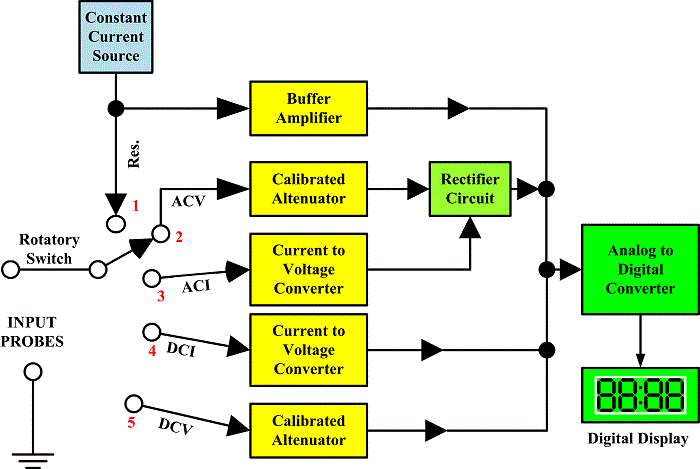
Digital Multimeter Block Diagram The following figure represents the digital multimeter block diagram with all the functional blocks.
Figure3 The auto-ranging digital multimeter (DMM) only requires you to choose your electrical quantity you are attempting to measure, make sure you are properly placing your leads into the correct terminals and then reading the LCD display. Auto-ranging digital multimeters allow technicians to spend more time getting to the root of a problem instead of switching and calculating.
Step by Step Guide on how to use a multimeter to test for voltage Testing for voltage is carried out to ensure the effectiveness of the electrical system. Loads (for example lights or motors) that are designed to do the work need a nominal voltage to operate. Overvoltage will result in equipment failure and not enough voltage will result in the load not turn on. When testing voltage there is an expected voltage reading to look for. If the load is rated at 120 volts then the expected reading from the outlet needs to be 120 volts plus or minus 10%. If the voltage reading is out of specifications then the problem can be found using the voltmeter to isolate the load and find if there is a problem with the source or the load. Here is a step by step guide on how to use a multimeter to test for voltage:
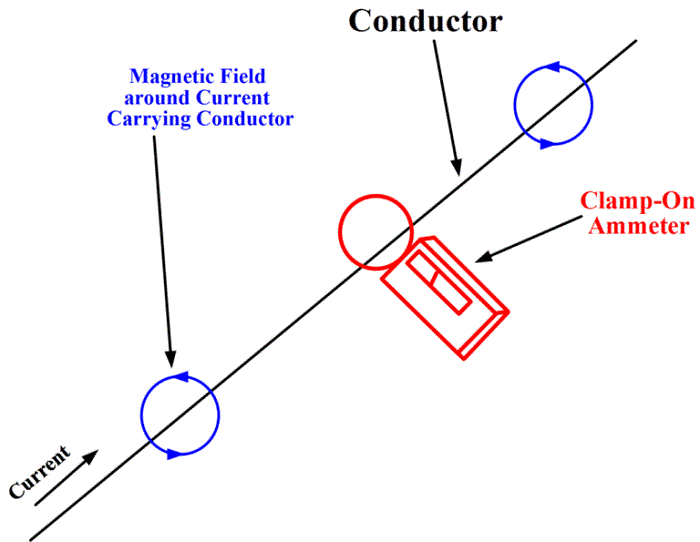
Step by Step Guide on how to use a multimeter to test for Current Testing for current is used when there is no physical way to tell if a load is doing its job because there are no indicators or the load is located in a hazardous area. When the voltage is tested and found to be present at the load, it doesn’t tell the whole story until a current is measured. It is important to understand a load consumes power which is measured in watts. Watts is calculated by multiplying volts by the amps. A digital multimeter is used to measure or give a good indication of current flowing. Current can be tested in several ways; the most reliable procedure is using a clamp meter, shown in figure 4.
Figure 4
The advantage of using clamp meter is that measurements can be obtained even without opening the test circuit. Proper protective equipment must be worn before testing can be done.
Testing current with a clamp meter
Testing current with a Digital Multimeter
Note: For current measurements above 1A, normally clamp meter is used while for current less than 1A, a standard DMM is used. Step by Step Guide on how to use a multimeter to test for Resistance Resistance testing is done to ensure the load or circuit being tested is complete. A complete circuit means there is no break or opening in the wires connected to the load or the internal components of the device being tested. An open circuit or broken line means that the load will not work as designed. Resistance testing is sometimes referred to as continuity testing. Continuity testing does the same action as resistance testing with the exception that continuity testing emits an audible sound indicating that the circuit or wires are complete. The resistance testing and continuity testing are also a good way to check for short-circuits and the ground fault which are events that cause circuit breakers to trip, fuses to blow, and possible injury to workers in the field. To test resistance with a Digital Multimeter
Note: It is important to have good contact between the test leads and circuit being tested. Dirt, bodily contact, and poor test lead connection can considerably alter the readings.
Test continuity with a Digital Multimeter
The DMM beeps under good continuity that allows the flow of current. If no continuity exists, the DMM does not beep. Difference between Analog and Digital Multimeter
www.bennypass.it
|

+(39) 347 051 5328
Italy - Kazakhstan


09.00am to 18.00pm
About
We offer the best and economical solutions, backed by 27+ years of experience and international standards knowledge, echnological changes, and industrial systems.
Our Services
Marketing Materials


Marketing Materials1


